Hybrid AD Manager by TideReach Ltd Download
Active Directory and Entra ID, one console · version 1.2

The Active Directory admin tools, rebuilt for the browser, with Entra ID beside them.

Users and Computers, Sites and Services, Domains and Trusts, DNS and Group Policy Management in one window, plus your Entra ID tenant merged into the same view, nineteen reports on the state of your directory, and offboarding that does both sides at once and can be undone. Every user shows at a glance whether it is synced, cloud-only or on-premises only.

It runs in a browser, so it runs on your machine. The Microsoft consoles are Windows-only: on a Mac, a Linux desktop or an iPad there is no RSAT to install, and the usual answer is a Windows VM, a jump box or a remote desktop session to a server. This needs none of them.

Download the free edition See pricing One MSI. No agents on workstations, no database, nothing leaves your network.
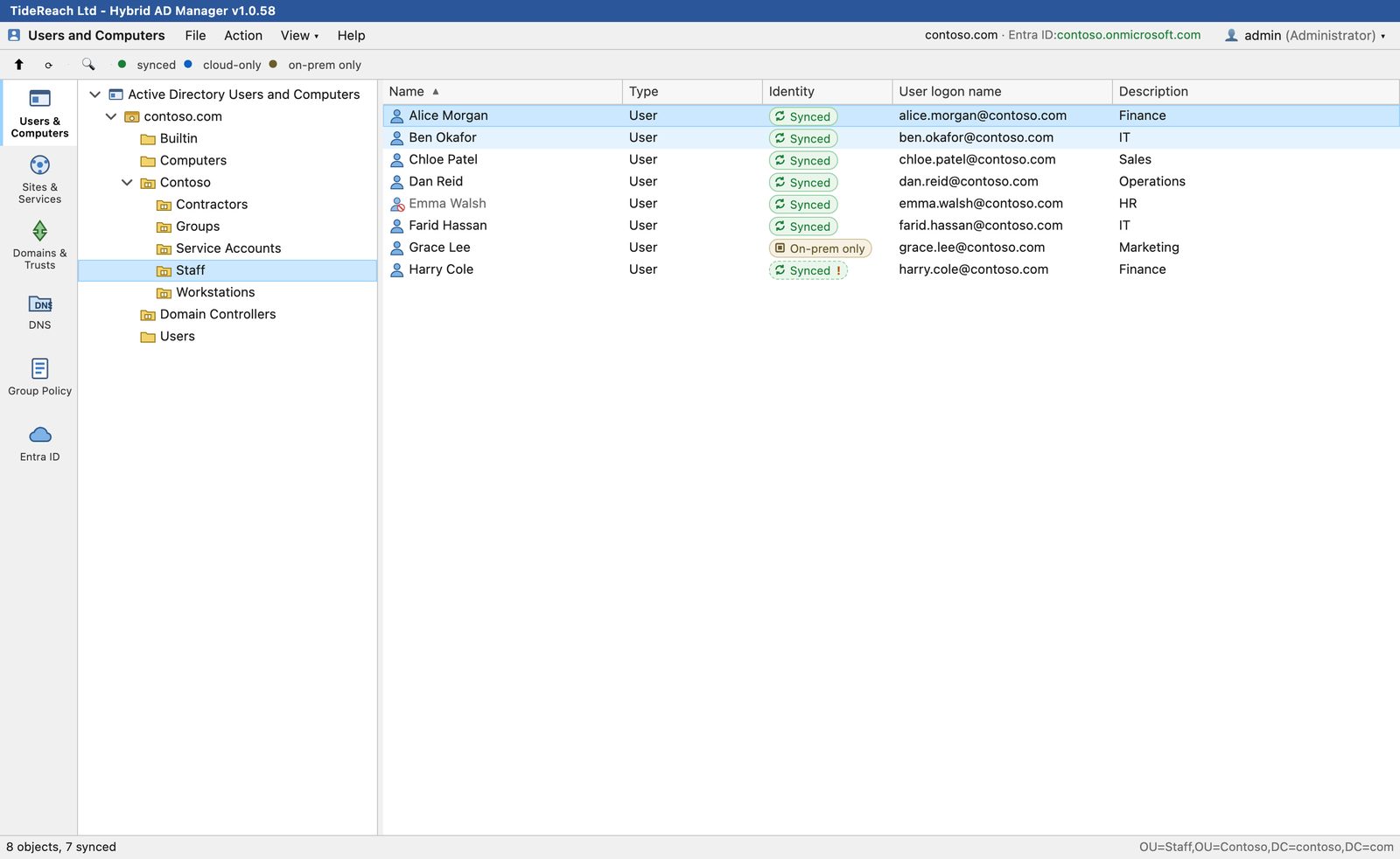
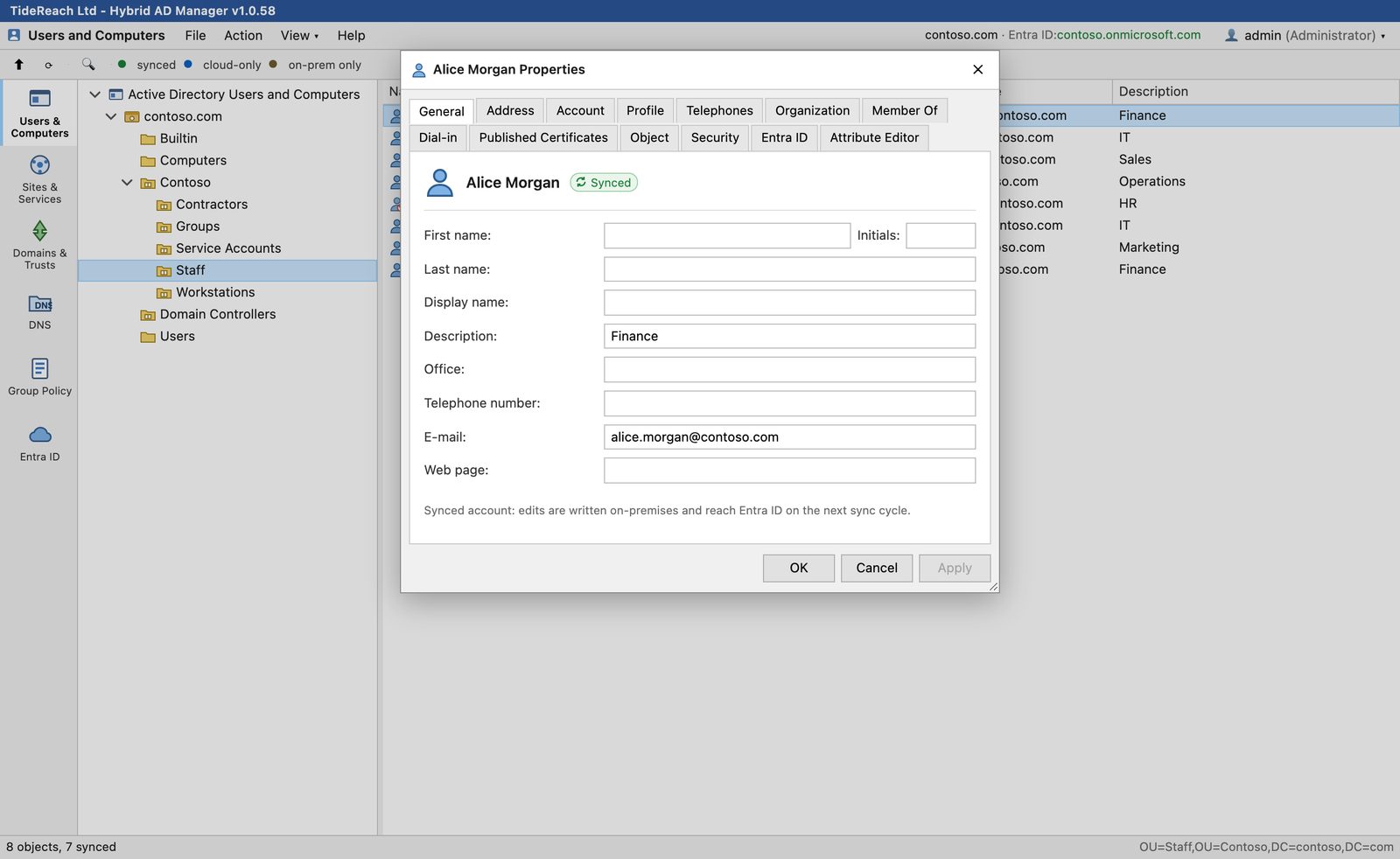
Users and Computers in Hybrid AD Manager: the Staff OU of contoso.com with each user marked synced or on-premises only
7 admin toolsthe five Active Directory consoles, Entra ID and Reports
19 reportsstale accounts, passwords, privileged access, charts and export
macOS, Linux, iPadOSanywhere with a browser, no RSAT and no jump box
Free editionevery console, read-only lists up to 15 items
The tools

Everything you open the Active Directory consoles for, without a jump box.

Each tool has its own tab down the left, laid out the way the Microsoft MMC console lays it out, so nobody needs retraining. If you have the Remote Server Administration Tools (RSAT) installed today, this replaces them — and on the machines where RSAT cannot be installed at all, it is the only way to get these consoles without a Windows desktop in front of you. Right-click menus, property sheets and the Attribute Editor are all where you expect them.

ADUsers and Computers

Manage the directory and see the cloud state of every account.

  • Create, move, rename, enable, disable and delete users, groups, computers, OUs and contacts.
  • Reset passwords, unlock accounts and edit group membership.
  • An Identity column shows synced, cloud-only or on-premises-only for every object.
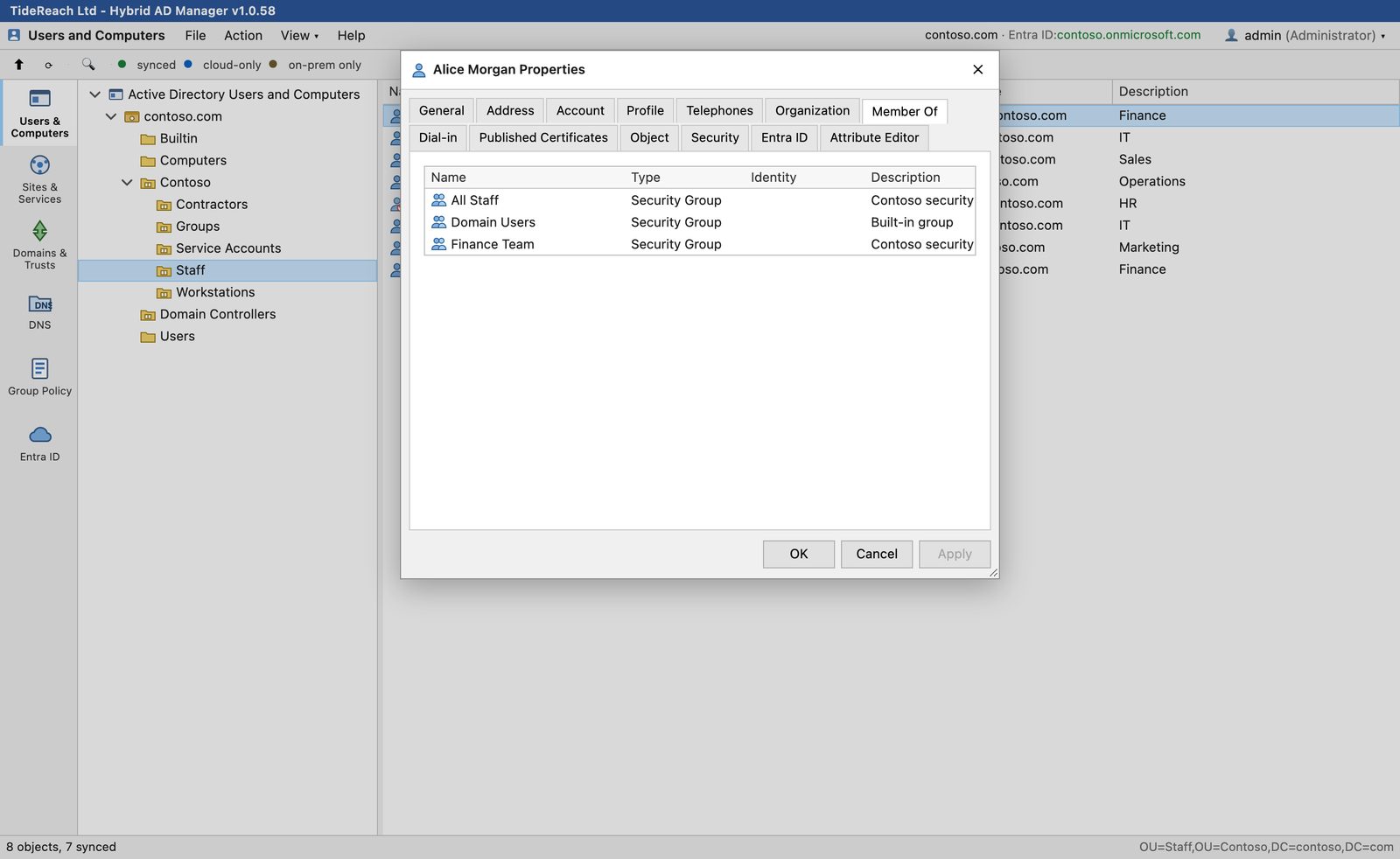
Member Of tab of a user's property sheet
SSites and Services

Sites, subnets, site links and server objects.

  • Create sites, subnets and site links, and move servers between sites.
  • Site links, site link bridges and NTDS settings sit in the tree where the Microsoft console puts them.
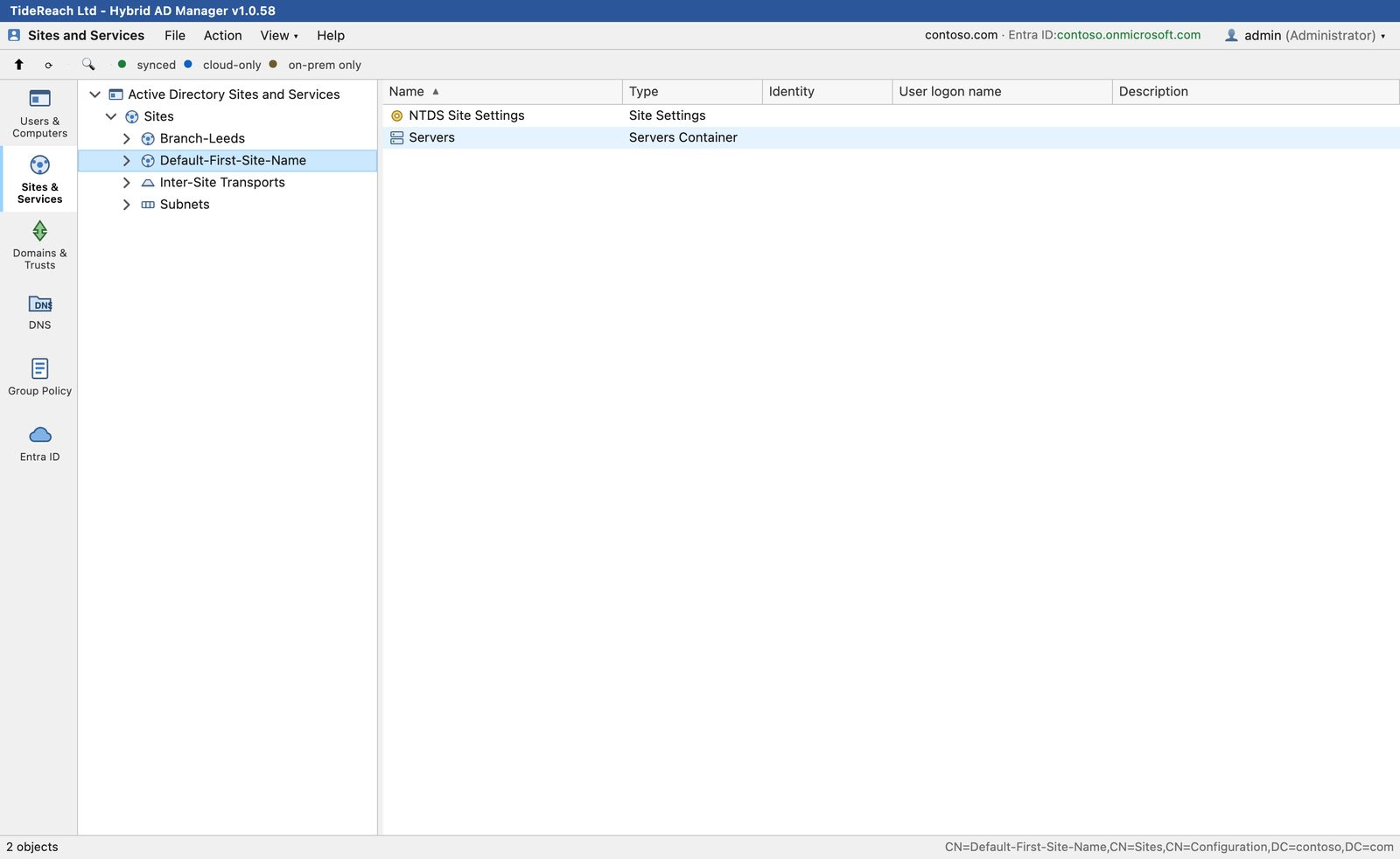
Sites and Services showing Default-First-Site-Name
TDomains and Trusts

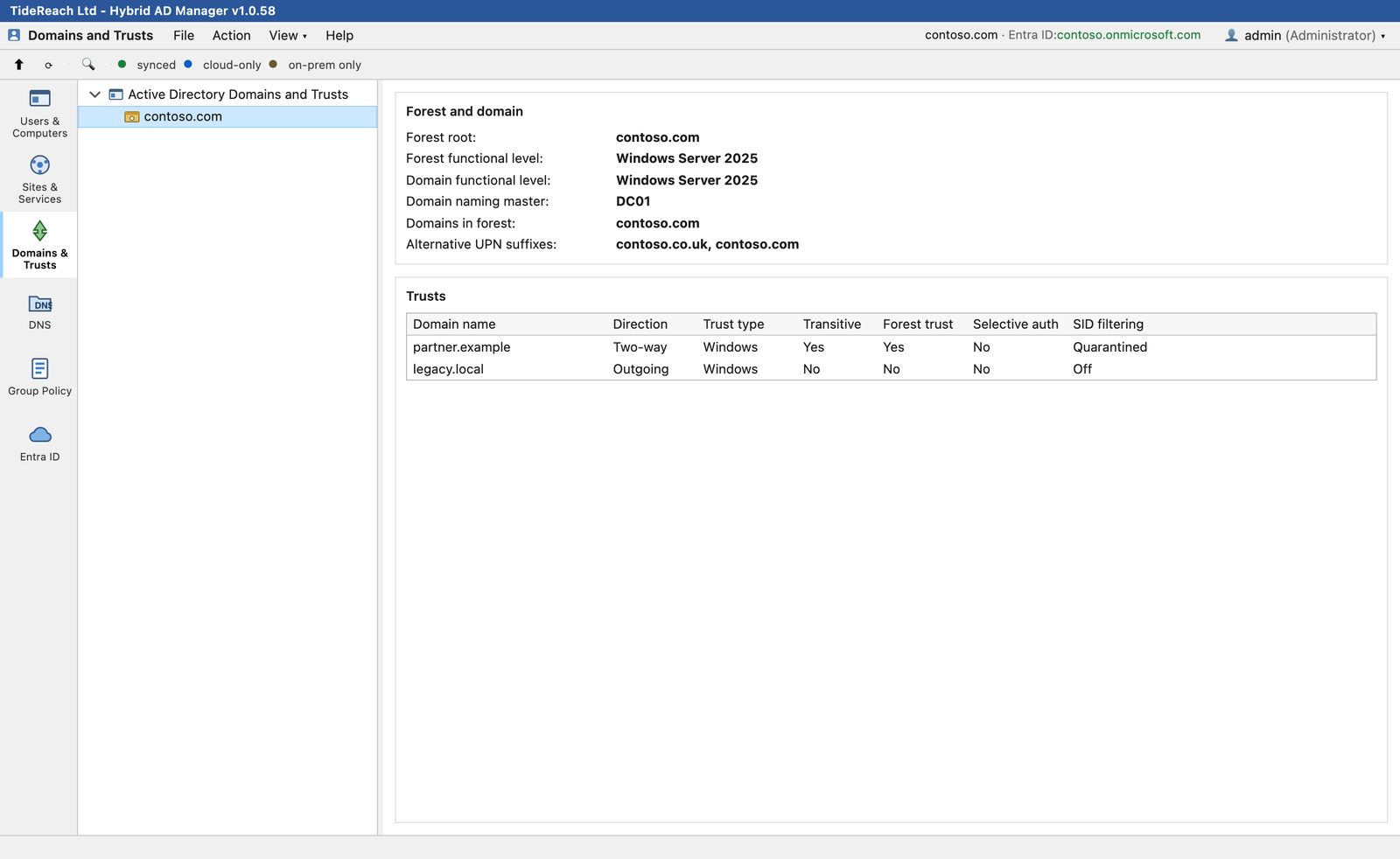
Forest and domain facts, trusts and UPN suffixes on one page.

  • Functional levels, FSMO role holders and the domains in the forest.
  • Every trust with direction, type, transitivity, selective authentication and SID filtering.
  • Switch between trusted domains from the menu bar with a licence that covers more than one.
Domains and Trusts page for contoso.com
DNSDNS

Forward and reverse zones, records and timestamps.

  • Browse AD-integrated zones and filter records as you type.
  • Add, edit and delete A, AAAA, CNAME, MX, PTR, SRV and TXT records.
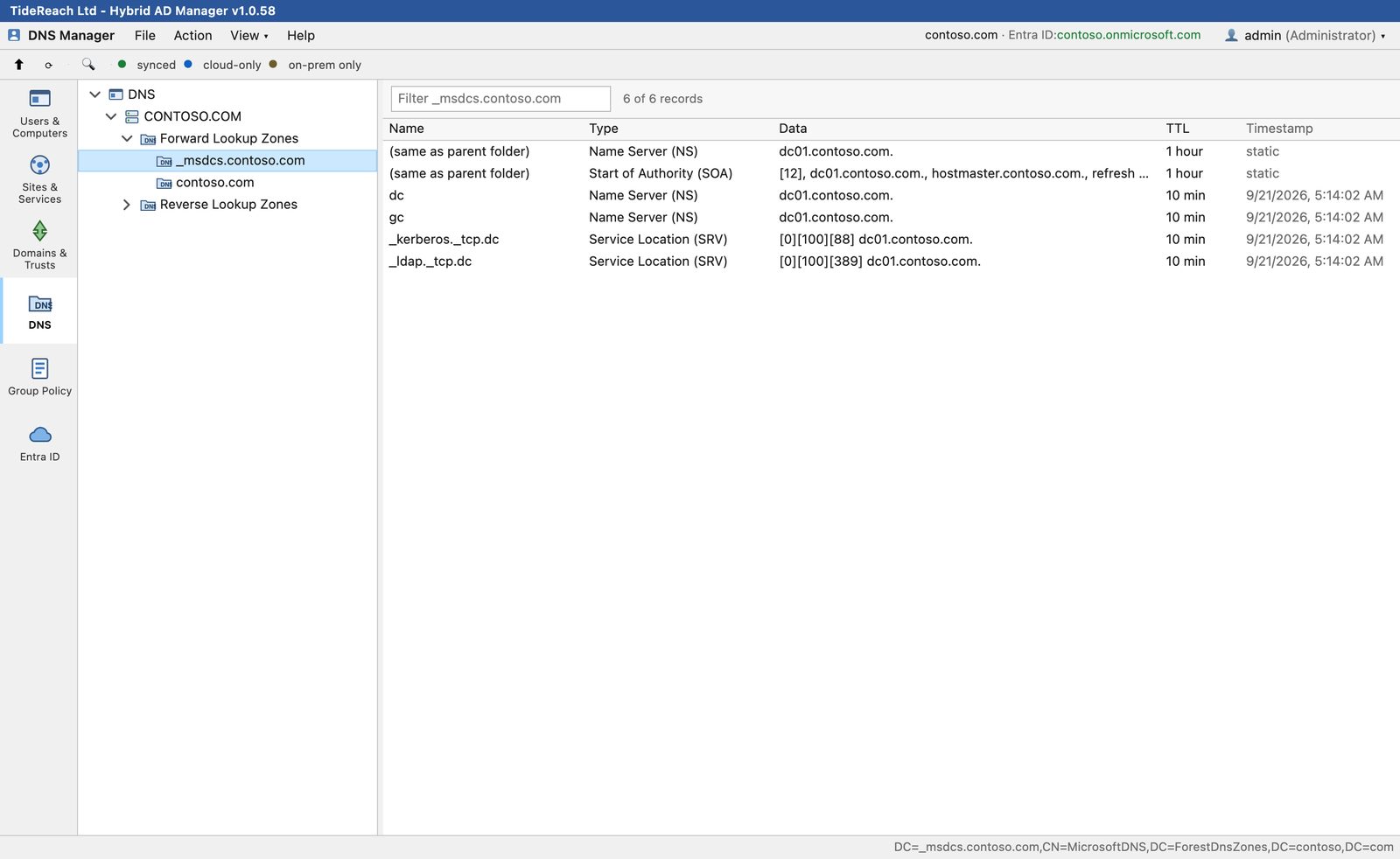
DNS Manager showing the _msdcs zone records
GPGroup Policy Management

Links, order, enforcement and inheritance.

  • Link an existing GPO, reorder links, enforce, disable and block inheritance.
  • Create, rename and delete GPOs, including the SYSVOL folder.
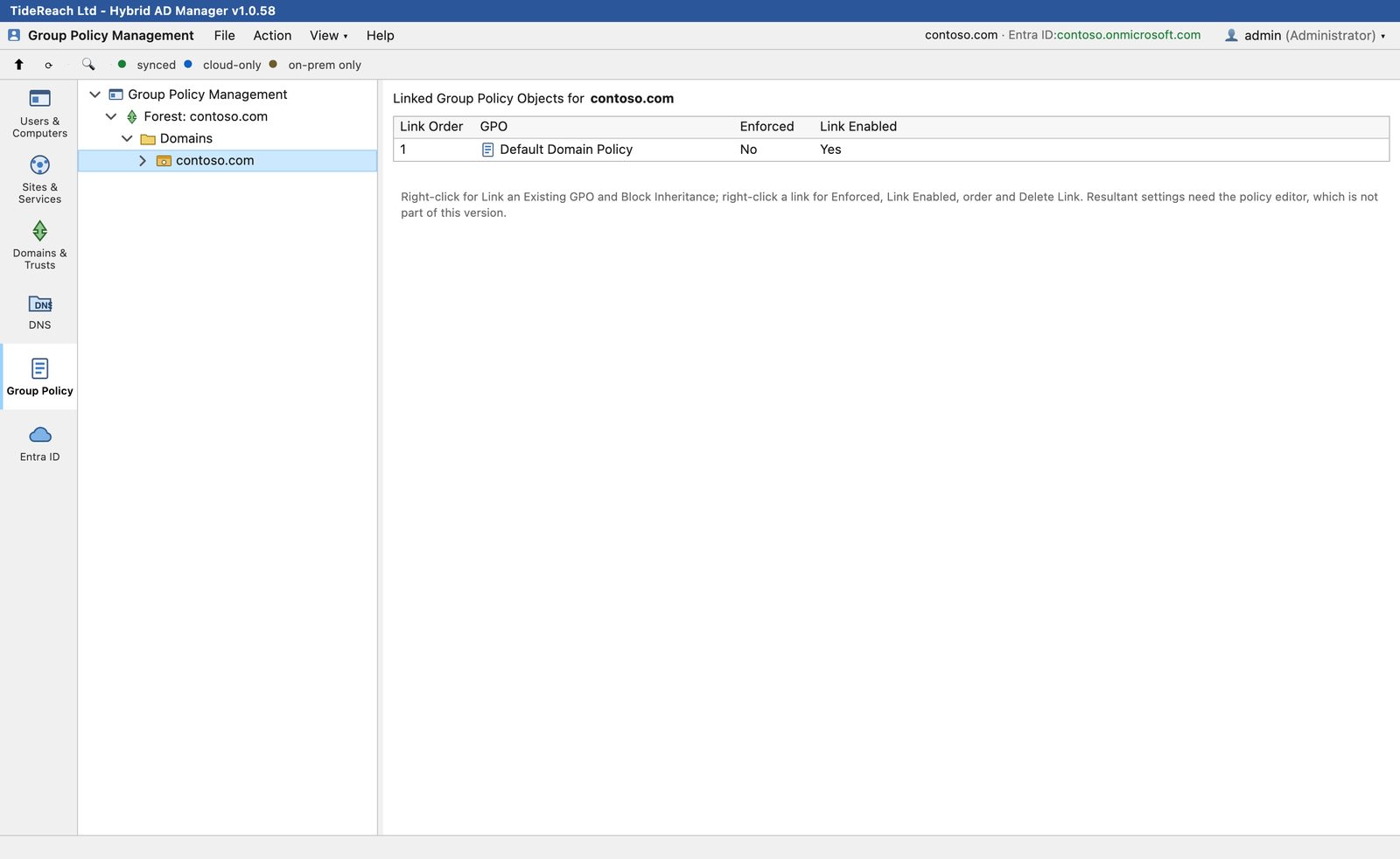
  • The settings editor inside a GPO is on the roadmap; use GPMC for that today.
Group Policy Management showing linked GPOs for contoso.com
IDEntra ID

The tenant, merged with the domain.

  • Users and groups from Microsoft Graph, matched to their on-premises accounts.
  • Create cloud users and groups, block sign-in, reset passwords and edit membership.
  • Warnings flag accounts that are linked but no longer sync-enabled, or exist on one side only.
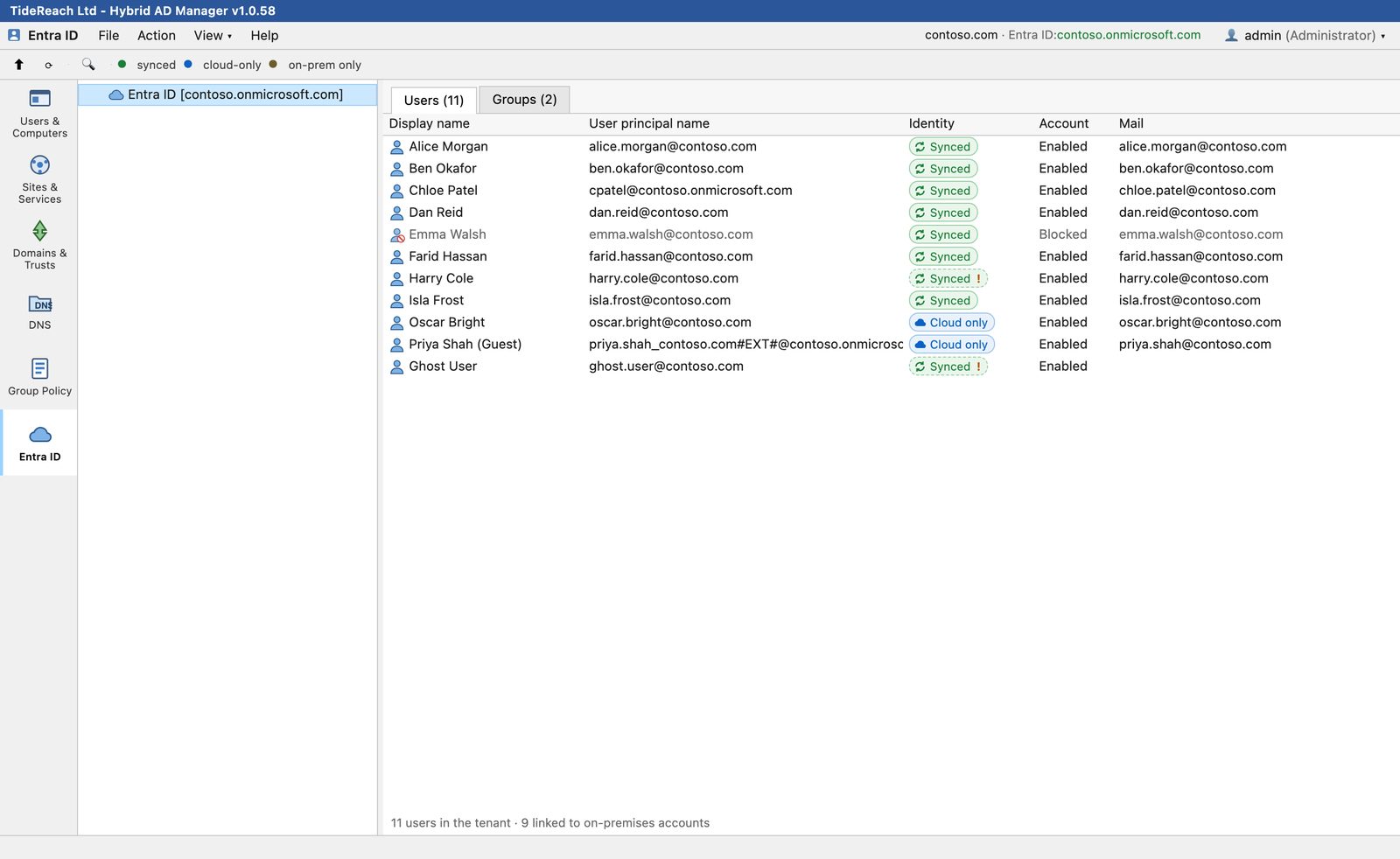
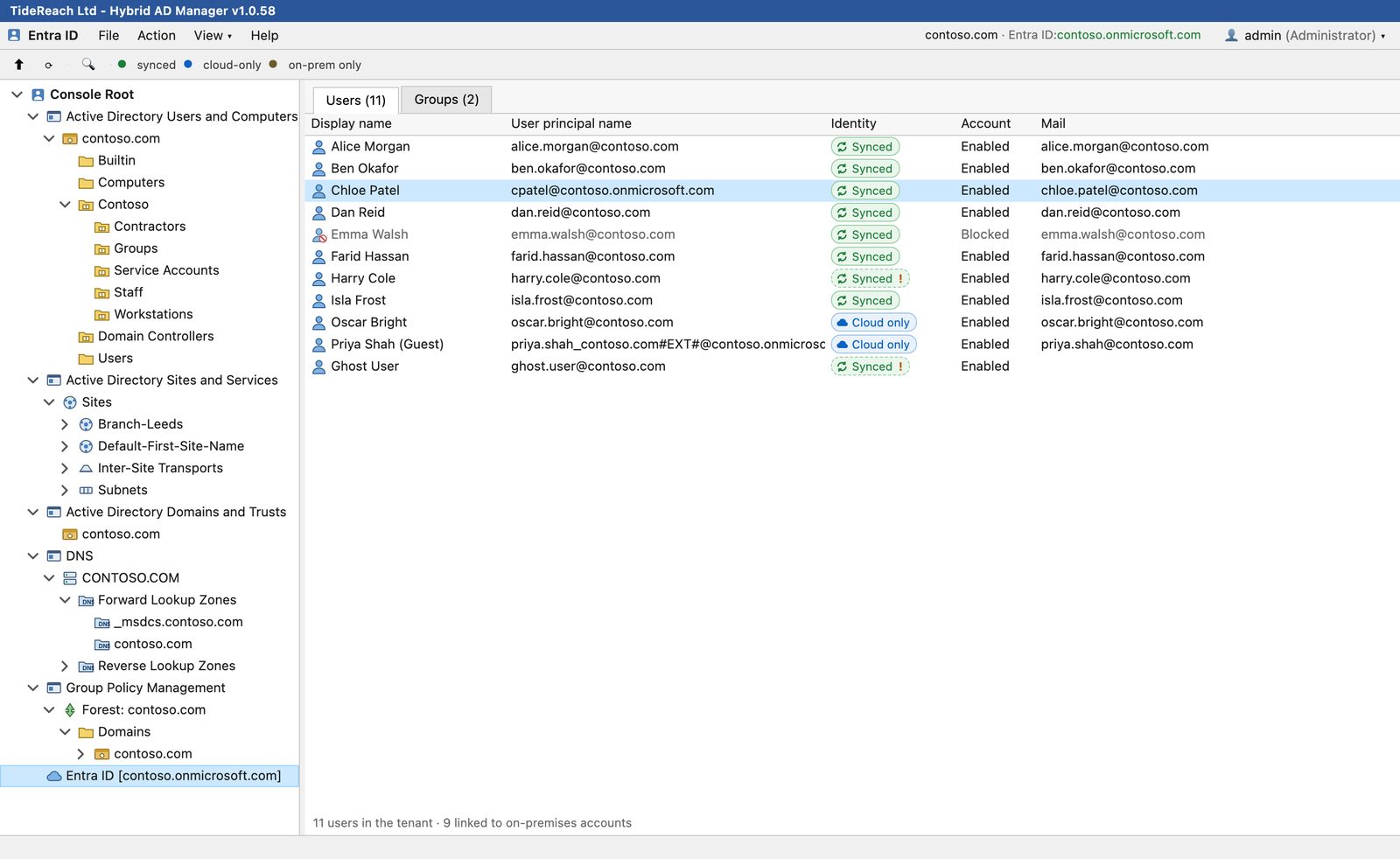
Entra ID users with synced and cloud-only markers
Reports

Nineteen reports on the state of your directory, with the charts already drawn.

The questions an auditor asks and nobody has a quick answer to. Stale accounts, accounts that have never signed in, passwords that never expire, who is in Domain Admins, which computers are still on an operating system you stopped patching. Each one runs on demand, draws its own chart, and exports to CSV or prints to PDF.

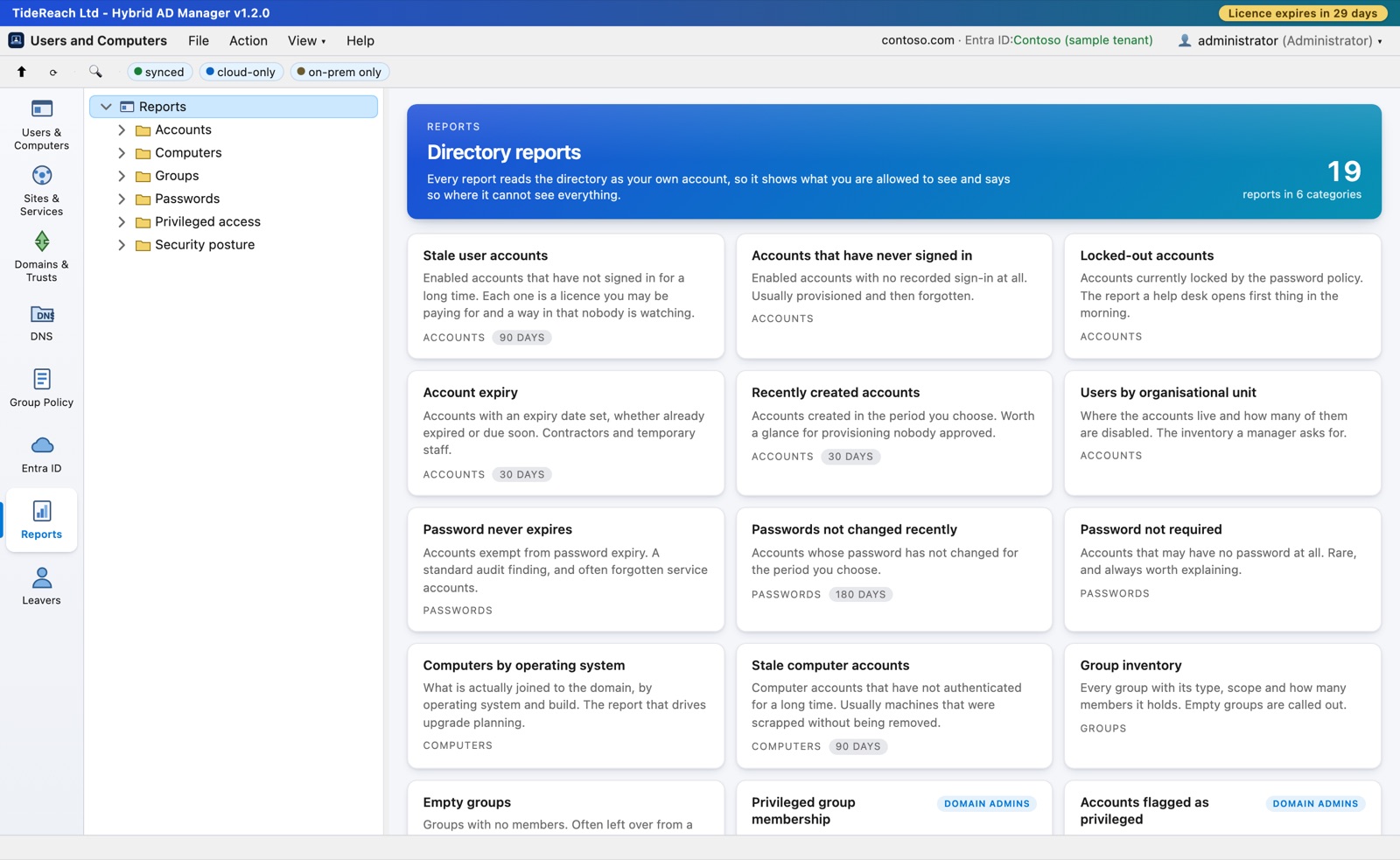
The Reports catalogue: nineteen reports grouped into Accounts, Computers, Groups, Passwords, Privileged access and Security posture
01Accounts and passwords

Find what has been left behind.

  • Stale accounts and accounts that have never signed in, bucketed by how long it has been.
  • Locked-out accounts, accounts due to expire, and accounts created in the last month.
  • Passwords that never expire, passwords nobody has changed in a year, accounts that need no password at all.
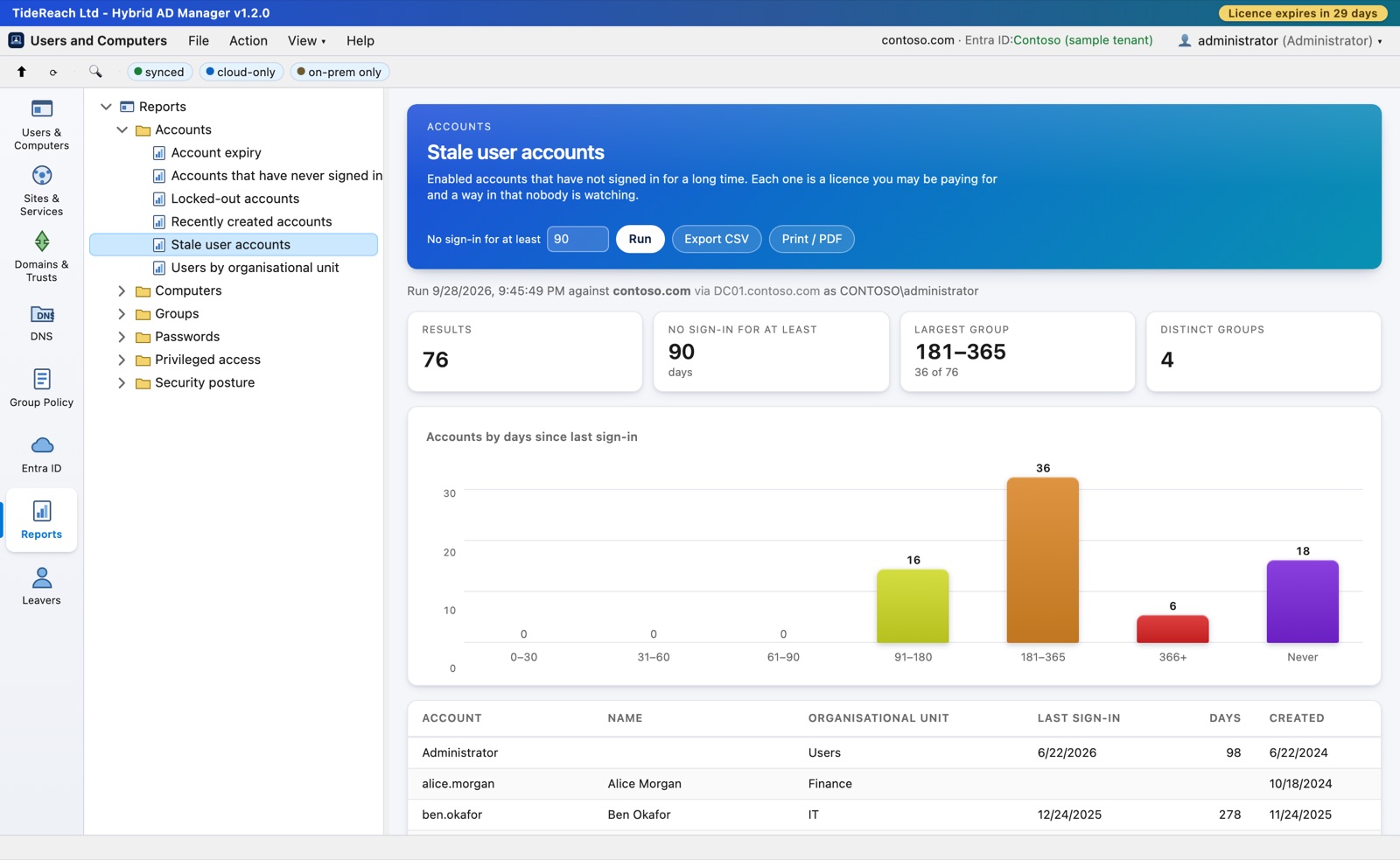
Stale user accounts report with a chart of accounts by days since last sign-in
02Inventory

The answers a manager asks for.

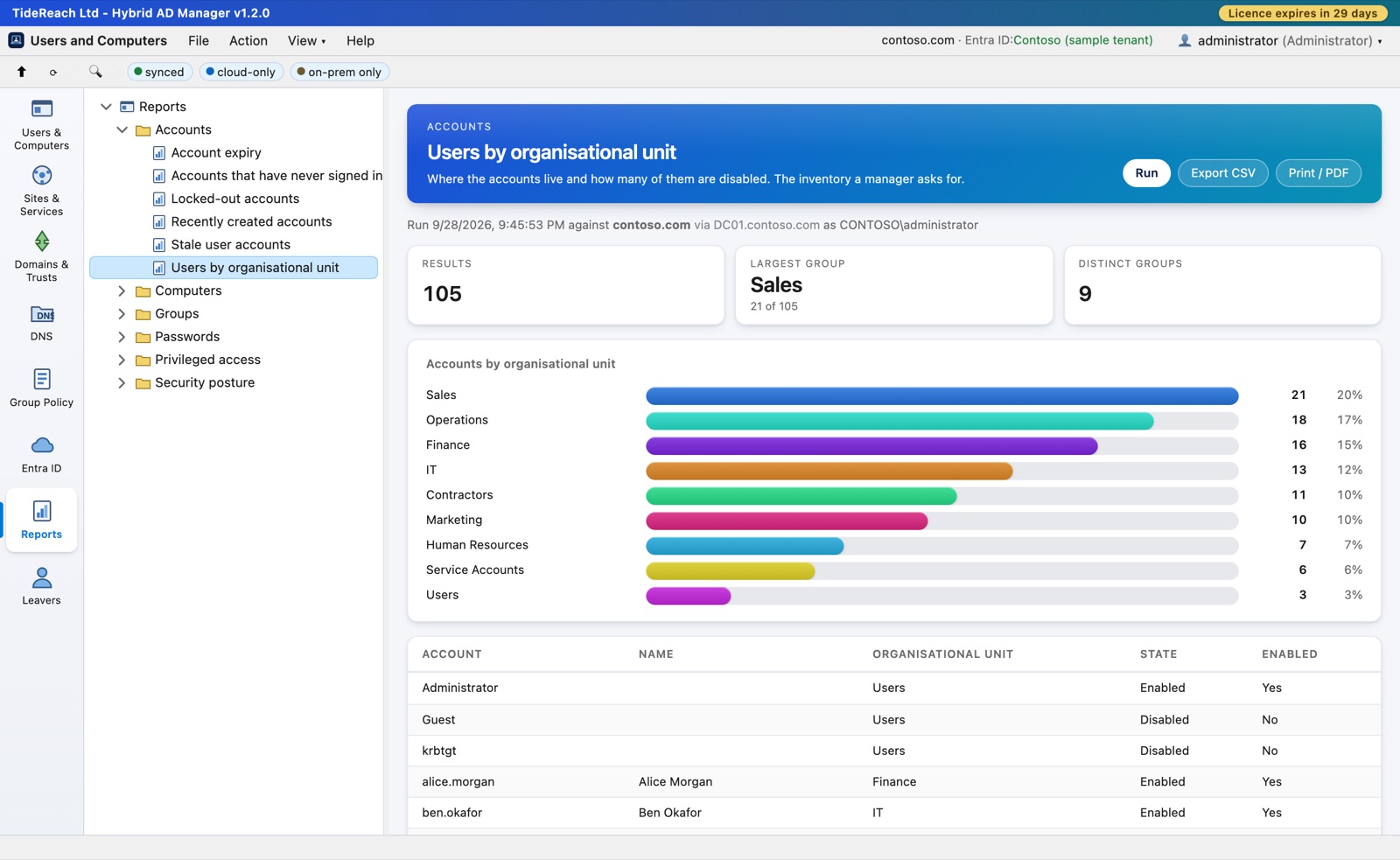
  • Users by organisational unit, and how many of them are disabled.
  • Computers by operating system and build — the report that drives upgrade planning.
  • Every group with its type, scope and member count, and the empty ones called out.
Users by organisational unit, charted by department
03Privileged access and security posture

Who holds the keys, and what is weakly configured.

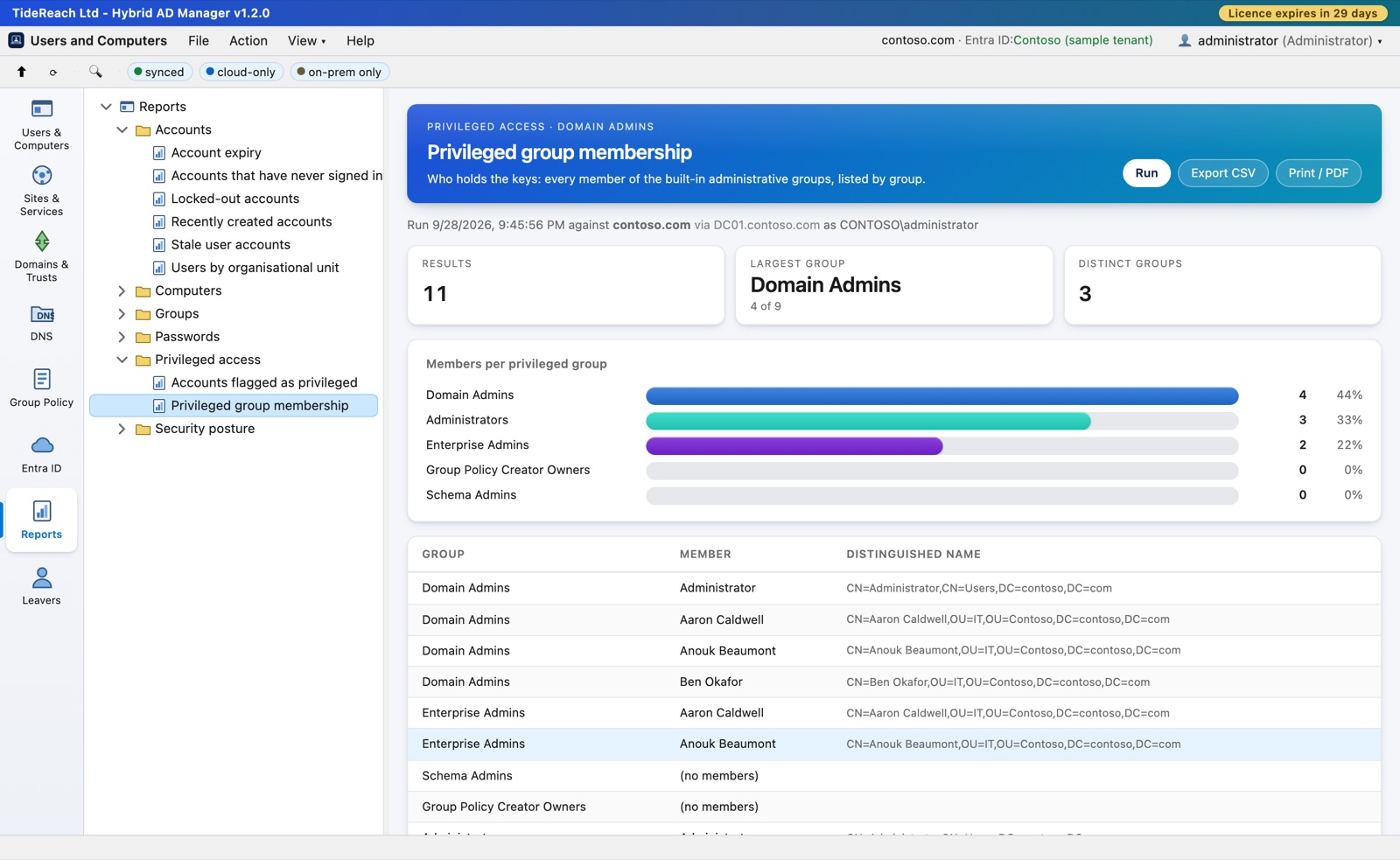
  • Every member of the administrative groups, listed by group, with the empty ones shown as empty.
  • Unconstrained delegation, Kerberos pre-authentication disabled, reversible password encryption.
  • Service accounts carrying a service principal name, and accounts the directory has flagged as privileged.
Privileged group membership report

It reads as you, and says when it cannot see everything

A report runs with your own account's rights. Active Directory quietly leaves out what you may not read rather than raising an error, so where that can have happened the report says so on its face and in the export. A figure you cannot trust is worse than no figure.

The privileged reports are for privileged people

Reports that list the membership of Domain Admins are only offered to accounts that are already in one of the administrative groups. For everyone else they are not in the list. Showing a help desk operator who holds the keys is reconnaissance, not reporting.

CSV and PDF that stand on their own

The export carries the title, when it ran, which domain and domain controller answered, and any caveat the report raised — so a spreadsheet that ends up in an audit file cannot be read as more complete than it is. Print gives a clean PDF of the report alone.

New in 1.2 · Leavers

Offboard somebody once, on both sides, with a record you can undo.

Doing it by hand means Users and Computers for the account, the Entra portal for the cloud, and a checklist in somebody’s head. Half-done leavers are the first thing an auditor asks about. This makes it one action: disable, reset the password, revoke the cloud sessions, strip the groups on both sides, move the account, note who did it — and keep a record of every previous value so it can be put back.

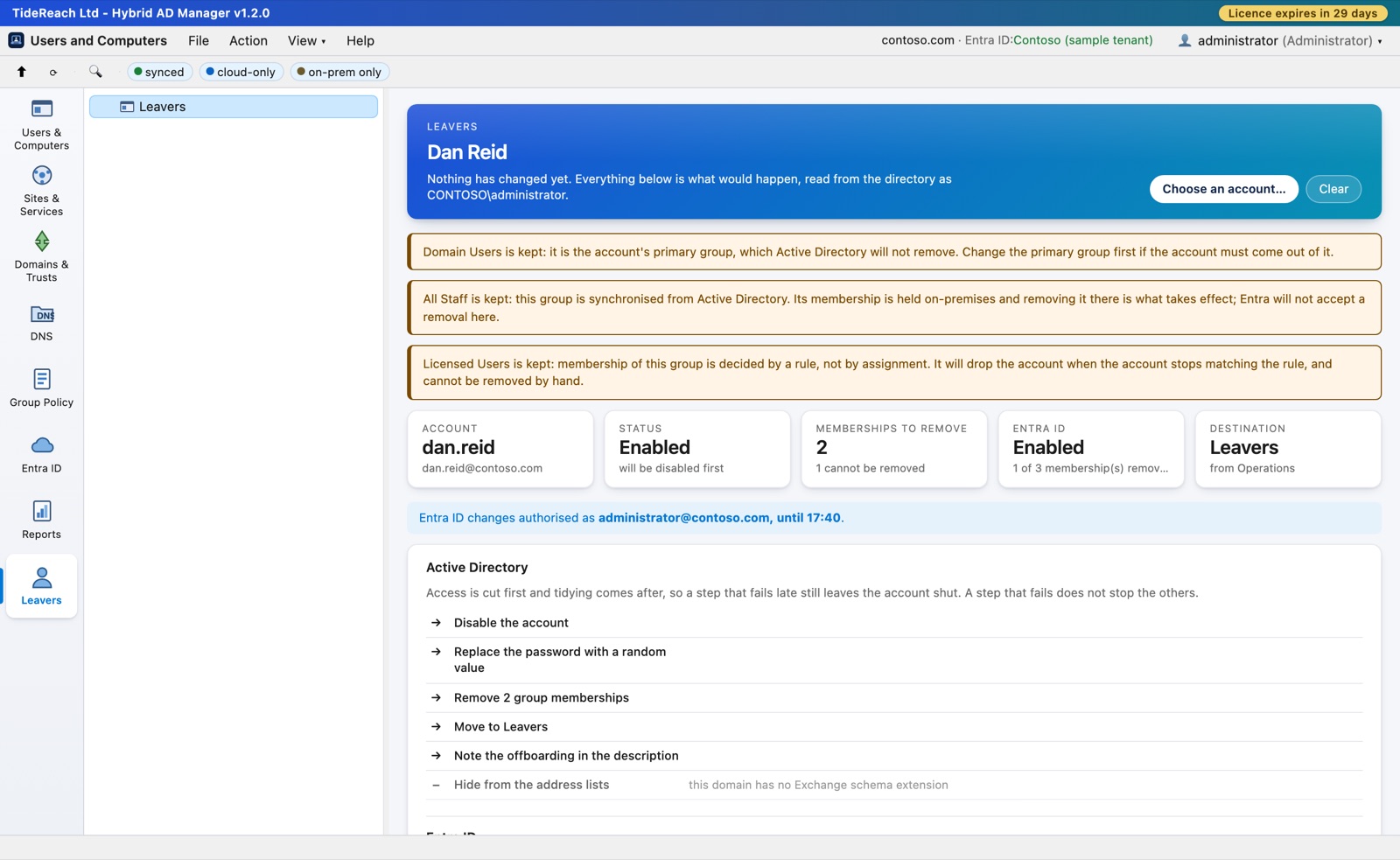
The Leavers screen showing the plan for an account: the memberships that will be removed, the ones that will be kept with the reason, and every step in the order it will run
01Nothing happens until you have read it

The plan, not a confirmation box.

  • Every group by name, every step in the order it runs, and the ones that will be skipped with the reason.
  • You type the account name to confirm. It is the one action that changes eight things at once.
  • Anybody whose manager is the leaver is listed and left alone: there is no correct answer to guess.
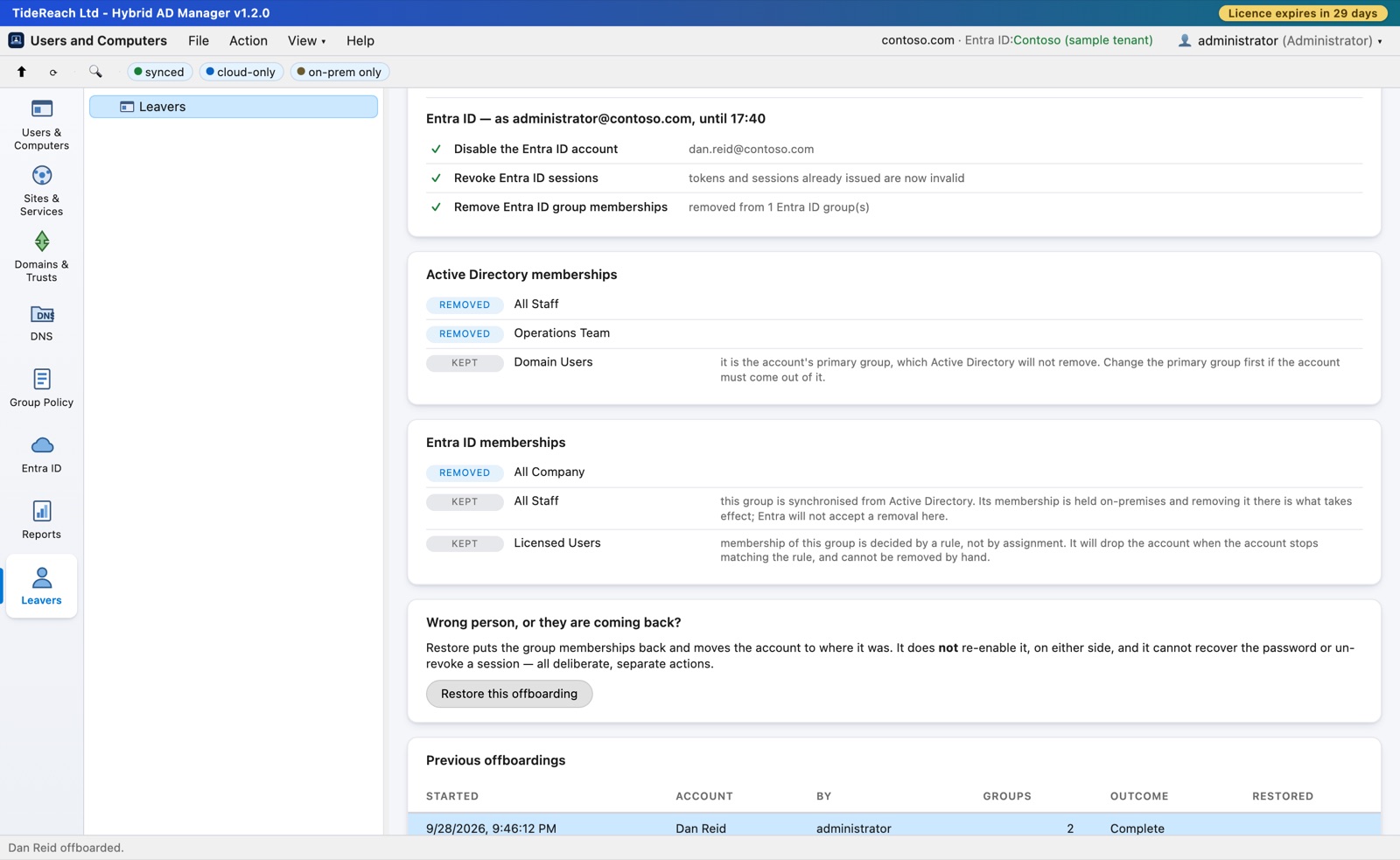
A completed offboarding: every step with its outcome, the memberships removed on both sides, the ones kept with the reason, and a Restore button
02The cloud half

Revoke the sessions, not just the account.

  • Disabling an Entra account stops new sign-ins and does nothing about the mail somebody already has open. A token that has been issued stays valid until it expires; a refresh token far longer.
  • So the sessions are revoked as well — the step everyone forgets, and the only one that closes the mailbox.
  • Groups synchronised from Active Directory, and dynamic groups, are shown as kept with the reason rather than promised and quietly failed.
03No standing access to your tenant

Your admins work as themselves. The app holds no permissions in your tenant at all.

  • Each administrator connects Entra ID once per session with their own Microsoft sign-in — usually one click — and everything on the cloud side is read and changed with their rights, never more.
  • Your Conditional Access and MFA apply, and Entra’s own audit log names the person rather than a service principal.
  • The app’s certificate only proves a sign-in is completed by your console. If it were ever stolen, it would read nothing and change nothing.

A record, and a way back

Every run writes what it did, what it kept and why, and the previous values, as a file on your own server. Restore puts the memberships back on both sides and moves the account home. It does not re-enable the account, on either side — returning somebody’s groups is recoverable, turning their account back on is a decision to take on purpose.

Safe to run twice

A leaver somebody started by hand can be finished properly: steps already done are skipped with the reason, the note in the description is replaced rather than repeated, and a step that fails does not stop the ones that matter. Access is cut first and tidying comes after, so a run that dies half way leaves the account shut rather than tidy.

Delegated, and attributed

Offboarding needs the Operator role, and runs on the signed-in administrator’s own connection, so the domain’s permissions still decide what succeeds. The record carries both names — who made the on-premises changes and who authorised the cloud ones — because they need not be the same person.

The offboarding checklist for Active Directory and Entra ID, with the PowerShell for each step →

Property sheets

Thirteen tabs, the same thirteen Active Directory Users and Computers gives you today.

General, Address, Account, Profile, Telephones, Organization, Member Of, Dial-in, Published Certificates, Object, Security, Entra ID and Attribute Editor. The Security tab is a full ACL editor with an Advanced dialog for object and property-level entries.

General tab of a user's property sheet
General. Edits on a synced account are written on-premises and reach Entra ID on the next sync cycle. The sheet says so.
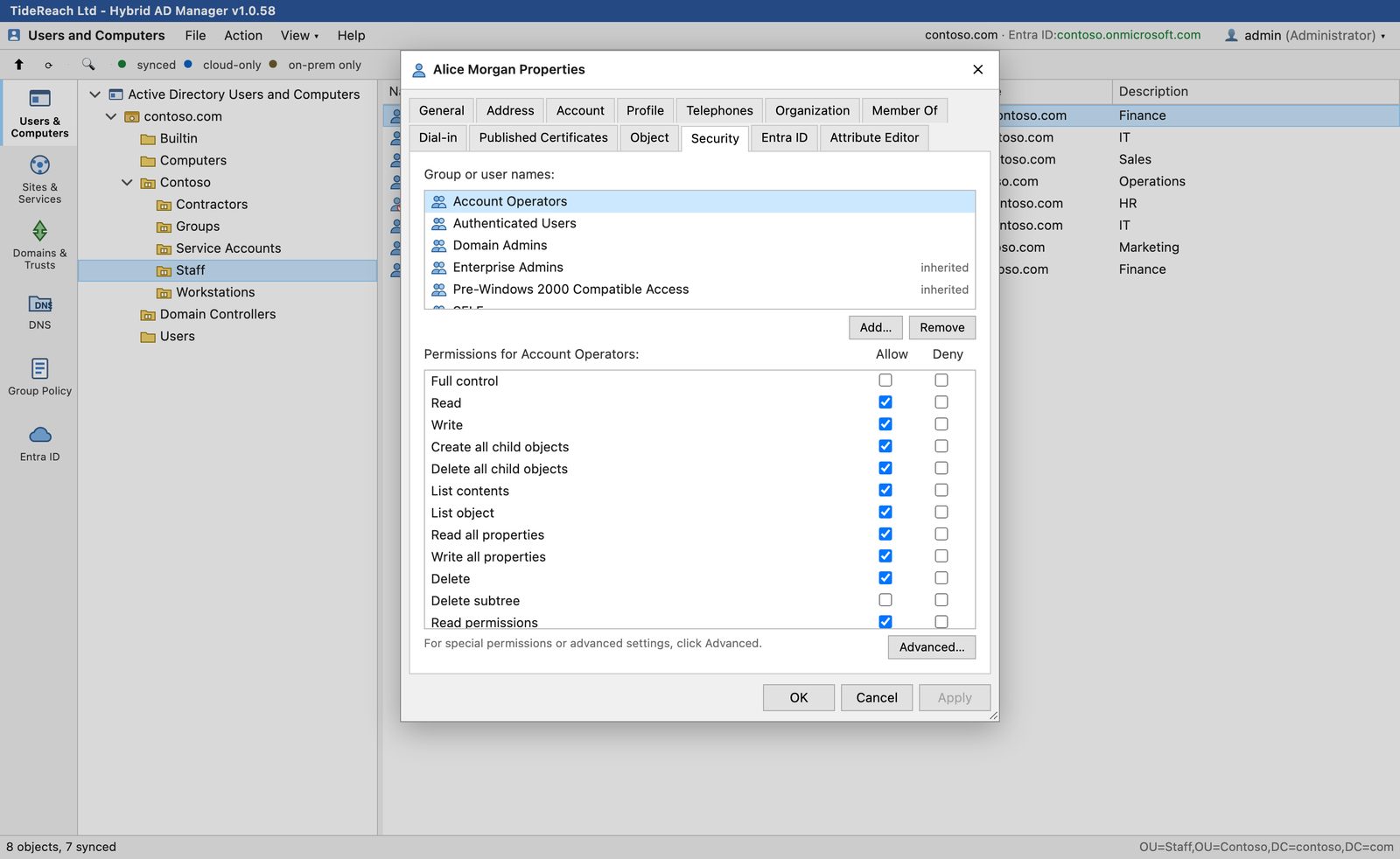
Security tab with the permission list for Account Operators
Security. Allow and Deny per trustee, inherited entries marked, and Advanced for the 80-plus extended rights and property sets.
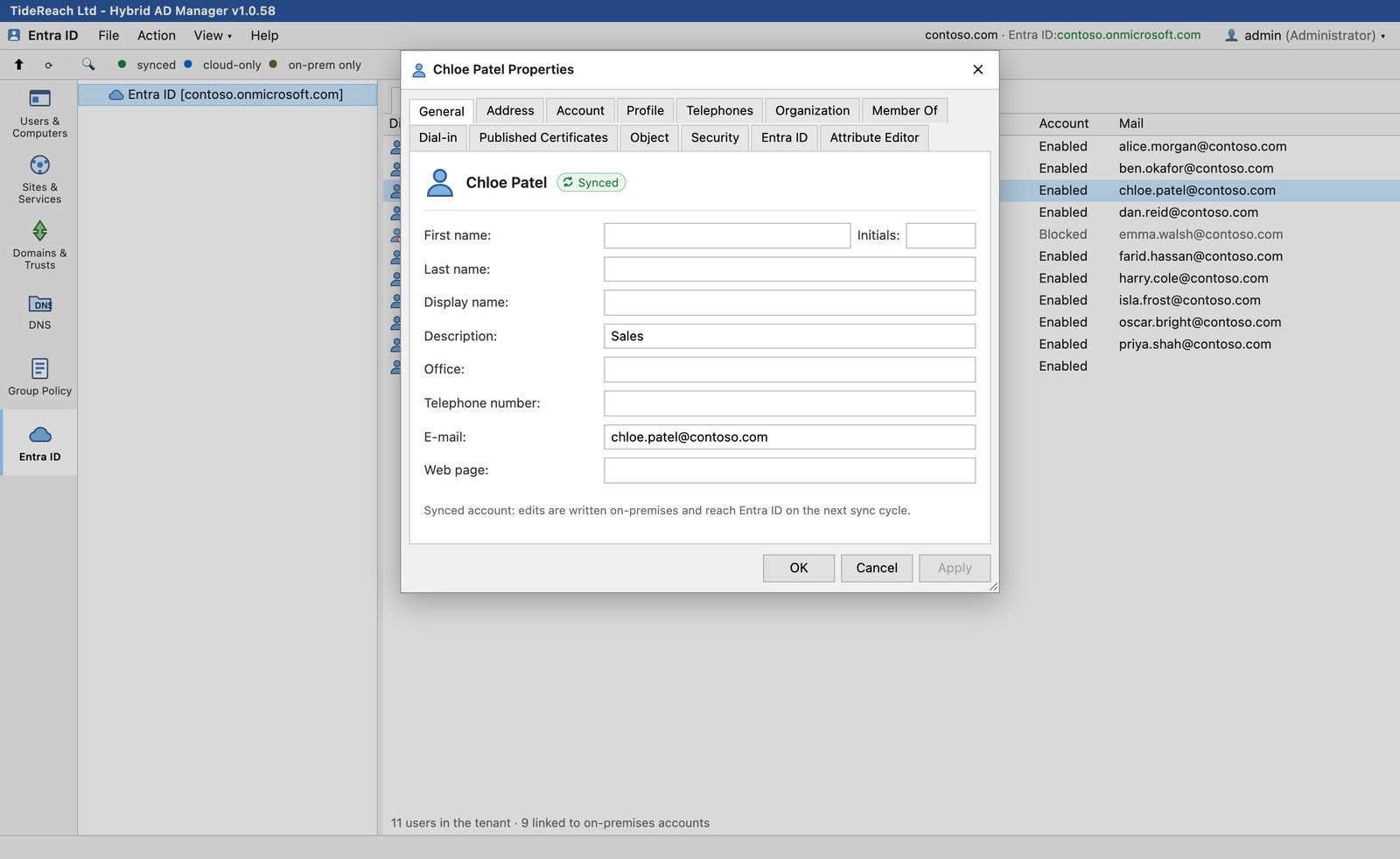
Entra ID tab for a synced user
From either side. Open a synced user from the Entra ID tab and you get the same full sheet, because it is the same person.
The console

Built for the way admins actually work.

Tab View or Combined View

One tool at a time down the left rail, or every console in a single tree like a saved MMC. Pick per browser from the View menu.

Combined View with all consoles in one tree

Sessions and seats

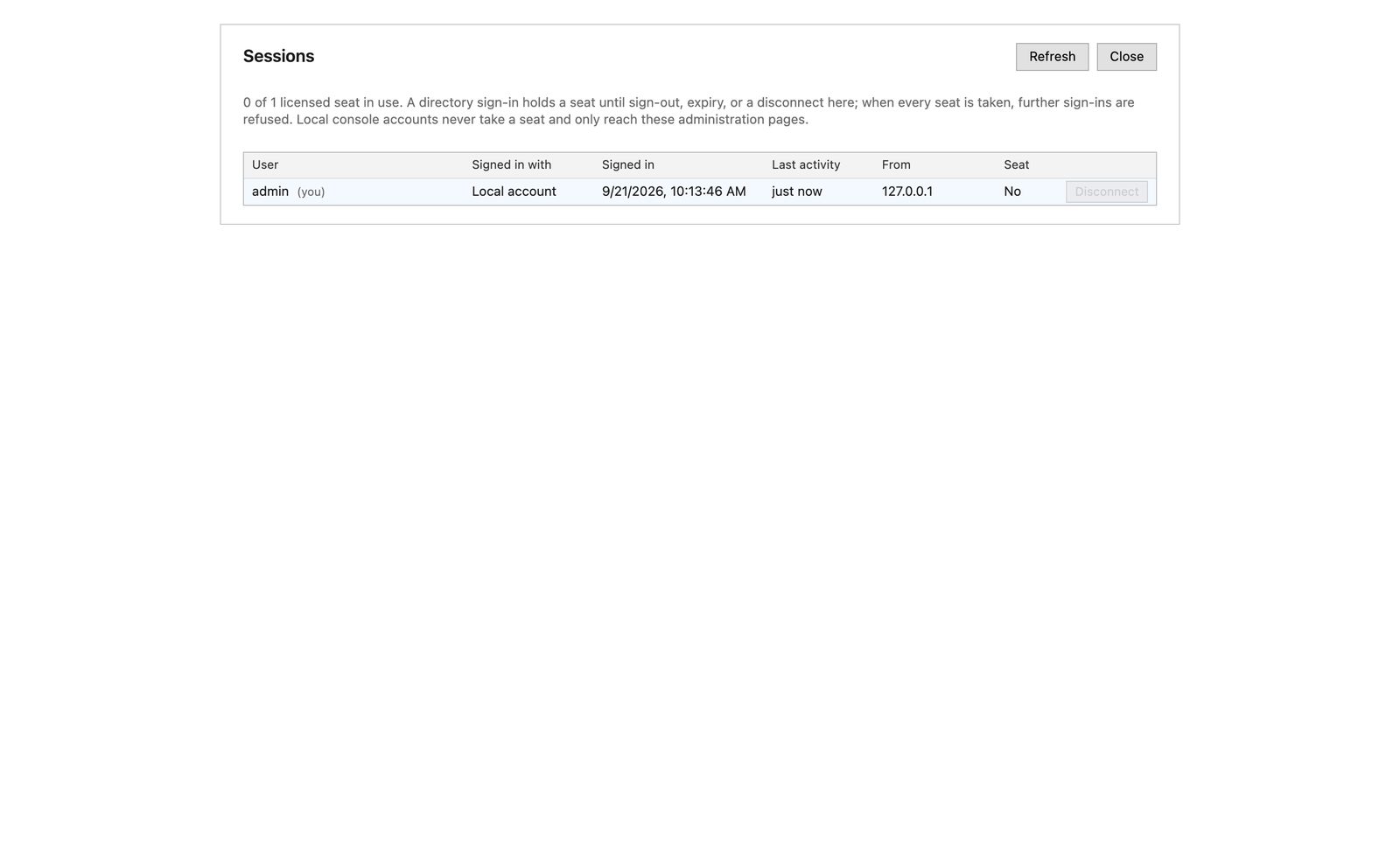
See who is signed in, from where, and disconnect a session. Seats are concurrent sign-ins; when they are all taken the next sign-in is refused rather than kicking someone off.

Sessions page listing signed-in users

Audit log

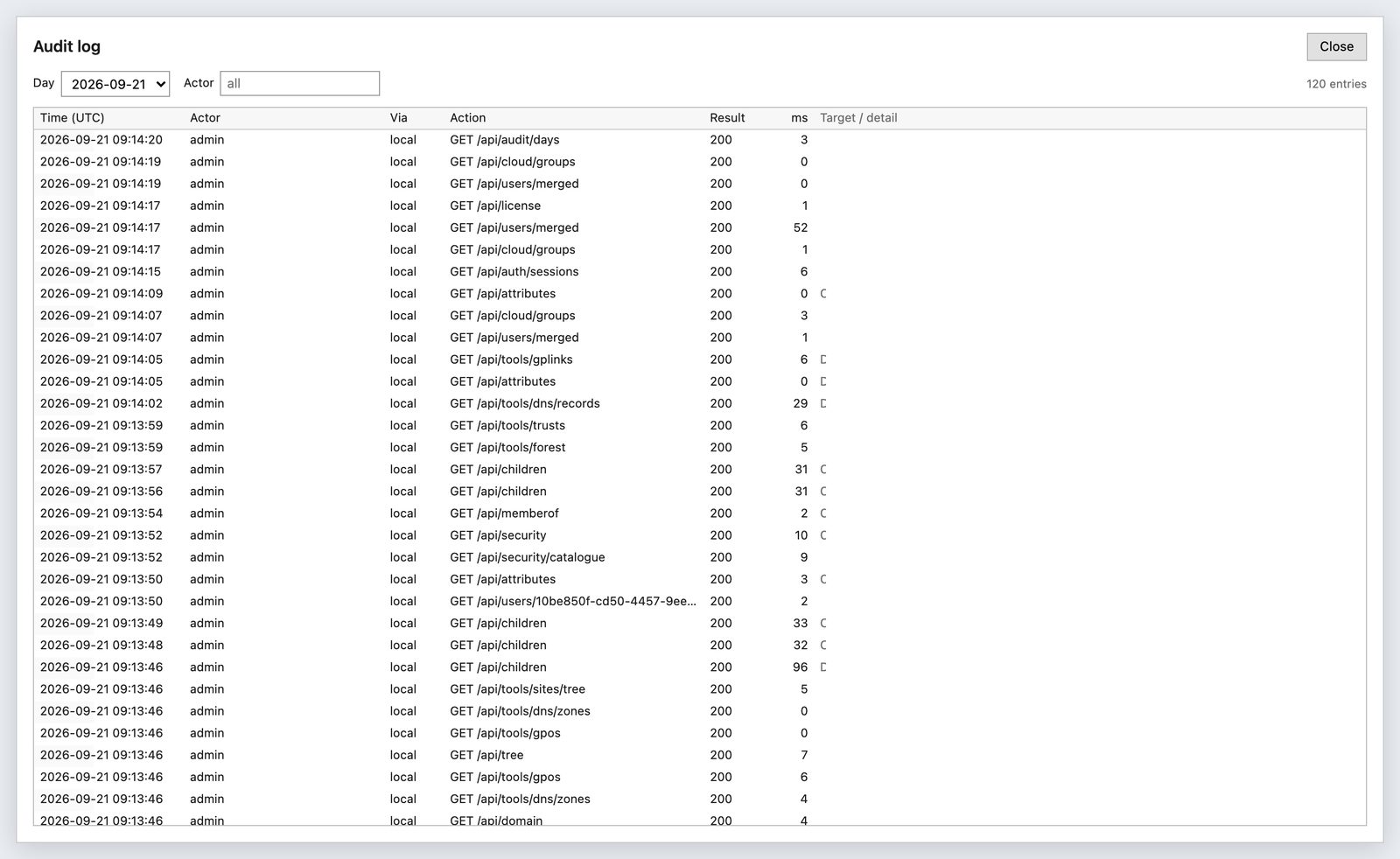
Every write records who, what, when and from where. Passwords never appear in it.

Audit log page

Sign in as yourself

Directory sign-in uses your own AD account over TLS, so every change is made as you and permissions are exactly what AD already gives you. Entra sign-in and local console accounts are also available.

Several domains

Add trusted domains and switch between them from the menu bar. Cross-domain credentials are handled for you, including external trusts.

Nothing leaves your network

The console itself is served over HTTPS, with your own certificate installed from Settings. It talks LDAPS to your domain controllers and, if you connect a tenant, HTTPS to Microsoft Graph. Licence keys verify offline. There is no telemetry.

macOS, Linux and iPadOS

RSAT does not run on your laptop. This does.

The Microsoft management consoles are Windows-only, and Microsoft has never shipped them for anything else. If your desk has a Mac or a Linux machine on it, administering Active Directory has meant a Windows virtual machine, a jump box, or a remote desktop session onto a server — one more thing to license, patch and get through a security review.

Nothing to install on your machine

The MSI goes on a Windows server once. After that it is a URL. Safari, Chrome, Firefox and Edge all work, on macOS, on any Linux desktop, and on an iPad.

No jump box, no RDP licence, no VM

No Windows desktop to keep patched for the sake of five consoles, no remote desktop hop, and no copy of your directory on a laptop. The browser talks to the server; the server talks to the domain over LDAPS.

Your rights, not a shared account

Sign in with your own Active Directory account and every read and write is made as you, so delegation you already have carries over — and the audit log names you rather than whoever last logged into the jump box.

The same console on a tablet

There is a phone and tablet layout for the things you do standing up: find a user, reset a password, unlock an account. The full console is there when the screen is big enough.

Every way to manage Active Directory from a Mac, Linux or an iPad, compared →

Installation

One MSI, ten minutes.

Install on a domain controller or any Windows Server 2019 or later member server, including Server Core. Admins then use it from any browser on any device. Upgrades are the newer MSI run over the old one; settings, keys and audit logs are kept.

Install the MSI

Double-click it, or from an elevated prompt:

msiexec /i HybridAdManager.msi /qn /norestart

Open the wizard

Browse to https://servername:5080, accept the self-signed certificate for now, and paste the setup token from the installer. Create the first console admin.

Sign in with your AD account

The wizard finds your domain controller. Optionally connect an Entra ID tenant with an app registration. Done.

Full details are in the Installation Guide. Day-to-day use is covered in the User Guide.

Pricing

Simple, per domain, for 12 months.

Start with the free edition, which includes every console, or try the full product free for 30 days. A licence key removes the list caps, enables writes and unlocks Reports. Prices are fixed in US dollars and in pounds sterling; pay in either currency at the price shown.

Free

$0(£0) forever
  • All six consoles, read-only
  • Lists show the first 15 items per container
  • Every property sheet and tab
  • Reports are not included
  • Use it to evaluate, or to give the help desk a read-only view
Download

Standard

$365(£275) per year
  • One domain, one Entra ID tenant
  • Two concurrent admin seats
  • All six consoles with writes, audit log, ACL editor
  • All nineteen reports, with CSV and PDF export
  • Updates for the licence term
  • Add domains and seats as you grow
Price and order Try it free for 30 days

Pro

from $995(from £745) per year
  • Everything in Standard
  • Multiple forests and tenants for MSPs and larger estates
  • Priority support and early access to the GPO settings editor
  • Available on request while the edition is finalised
Request a quote
Add-onPer yearNotes
Each additional domain$180 (£135)Trusted or separate forest, managed from the same console
Each additional seat$75 (£55)A seat is one signed-in directory user at a time

Every licence runs for 12 months from the date it is issued and does not renew automatically; the console warns in its title bar for the last 30 days. A licence key is issued for one installation in one domain: the Licence page in the console shows an Installation ID and the Domain SID, you send them with your order, and the key only works on that server in that domain. Keys are installed on the Licence page and verified offline. Local console accounts used to administer the service itself never take a seat. TideReach Ltd is not VAT-registered, so no VAT is added: the price shown is the price charged.

Against the built-in consoles

Free, but Windows-only, one console per window, and blind to Entra ID.

Against the AD suites

Comparable products start at several hundred pounds a year and price per help-desk technician. A customer with three domains and four seats pays $875 (£655) a year here.

Against the Entra admin centre

The portal knows nothing about the on-premises account behind a synced user. This console shows both sides together.

Questions

The things people ask first.

Does it need agents, a database or an internet connection?

No agents, no database and no internet. The service keeps settings, keys and the audit log in a folder under ProgramData. Microsoft Graph is contacted only if you connect an Entra ID tenant, and licence keys verify offline against the vendor's public key.

Can I use it from a Mac, a Linux desktop or an iPad?

Yes, and that is the point of it being a web console. The Remote Server Administration Tools are Windows-only, so on any other machine the usual options are a Windows virtual machine, a jump box or a remote desktop session. Here the MSI is installed once on a Windows server and everyone else just opens a URL in Safari, Chrome, Firefox or Edge. Nothing is installed on your own machine and no copy of the directory goes near it.

How does it compare with ManageEngine ADManager Plus?

ADManager Plus is a broad help desk platform built around approval workflows, automation and scheduled reports. Hybrid AD Manager is the Microsoft consoles rebuilt for the browser, with Entra ID merged in and your own Active Directory rights, at $365 a year against their $595 for one domain and two administrators. The full comparison, and which suits which team.

Are the reports in the free edition?

No. The free edition includes every console, read-only, with lists capped at 15 items; reports are part of the licensed editions. Capping a report at 15 rows would make it useless rather than limited, so it is a clean line: browse for free, report when you buy. Reports appear as a seventh tool in the console with the same licensing as the others.

Where does it run?

On Windows Server 2019 or later, as a Windows service installed by the MSI. A domain controller or a member server both work, including Server Core. Two cores and 2 GB of RAM are plenty.

Whose permissions apply when I make a change?

Yours. Sign in with your Active Directory account and every write is made with that account's rights, so delegation you already have in AD carries straight over. A service account can be configured for hosts that need one.

What happens when all seats are in use?

The next directory sign-in is refused with a message to contact TideReach Ltd for more seats. Nobody is signed out to make room. An administrator can disconnect a session from the Sessions page.

How do upgrades work?

Run the newer MSI over the existing installation. Settings, encryption keys, licence, audit logs and sessions are kept. The version is shown in the title bar and under Help, About.

How do I buy, and can I move the licence to another server?

Open the Licence page in the console and copy the Installation ID and Domain SID. Send them with the edition, number of domains and number of seats you want, and you receive a key that works on that installation only. If you rebuild or replace the server, send the new Installation ID and a replacement key is issued for the remainder of the term.

Can I edit the settings inside a GPO?

Not yet. Linking, ordering, enforcing, inheritance and creating or deleting GPOs are all there. The policy settings editor is the next major feature and Pro customers get early access.