 Hybrid AD Manager
Managing Active Directory from a Mac, Linux or an iPad
Active Directory Users and Computers, and the rest of Microsoft's Remote Server Administration Tools (RSAT),
install only on Windows. There is no version for macOS, Linux, ChromeOS or the iPad. PowerShell on a Mac does
not get you there either: PowerShell 7 runs on macOS and Linux, but the ActiveDirectory module comes with
RSAT and is Windows-only.
So an administrator whose own machine is not Windows has a choice of workarounds. Here they all are, with what each one costs you, followed by the console we built for exactly this.
1. Remote desktop to a Windows server
The usual answer. Keep a management server with RSAT installed (a domain controller works, though you should not be signing in to one for routine work) and connect to it with Microsoft's Windows App on macOS or iPad, or FreeRDP or Remmina on Linux.
What you get: the real consoles, so everything works, including the Group Policy editor.
What it costs: a server to patch and secure, which becomes the most attractive machine on your network because every administrator signs in to it. Windows Server allows two simultaneous administrative sessions; beyond that you need Remote Desktop Services licences. And every small task starts with a remote session, in which clipboard, keyboard shortcuts and screen size all behave a little differently. On an iPad it is hard work.
2. A Windows virtual machine on your own machine
Parallels, VMware Fusion or UTM on a Mac; KVM or VirtualBox on Linux. Install Windows, add RSAT, then either
join the VM to the domain or start the consoles with runas /netonly.
What you get: the real consoles, without a shared server.
What it costs: a Windows licence for each administrator, several gigabytes of memory, one more machine to keep patched, and very often a domain-joined computer travelling around on a laptop. It is not an option at all on an iPad or a Chromebook.
3. LDAP browsers and command-line tools
Apache Directory Studio runs on macOS, Linux and Windows and connects to a domain controller like any LDAP
server. ldapsearch and ldapmodify come with macOS and are a package away on Linux. Samba's samba-tool
can create and manage users and groups in a Windows domain.
What you get: free tools, scriptable, often already installed.
What it costs: these speak LDAP, not Active Directory. You see raw attributes: userAccountControl as a
number rather than "account is disabled", permissions as a binary security descriptor, and a password reset
that needs LDAPS and a correctly encoded unicodePwd. DNS zones, sites and Group Policy are not there. Fine
for a quick lookup; not something to hand to a help desk.
4. Windows Admin Center
Microsoft's own browser-based management tool. It is installed on a Windows server and used from any browser, a Mac's included. Its Active Directory and DNS tools are extensions you add separately, and they cover the basics: creating users and groups, group membership, resetting passwords, enabling and disabling accounts, and DNS zones and records.
What you get: a free tool from Microsoft that runs in a browser and covers everyday user and group tasks.
What it costs: it is a server-management tool with Active Directory added, rather than a directory console. It does not attempt Sites and Services, Domains and Trusts or Group Policy Management, and it has no view of Entra ID.
5. A browser console built for Active Directory
This is what Hybrid AD Manager is. One MSI goes on a Windows server you already have: a domain controller or a member server, Windows Server 2019 or later, Server Core included. Everyone else opens it in a browser on macOS, Linux, ChromeOS, an iPad, or Windows, and there is a phone layout for checking something on the move.
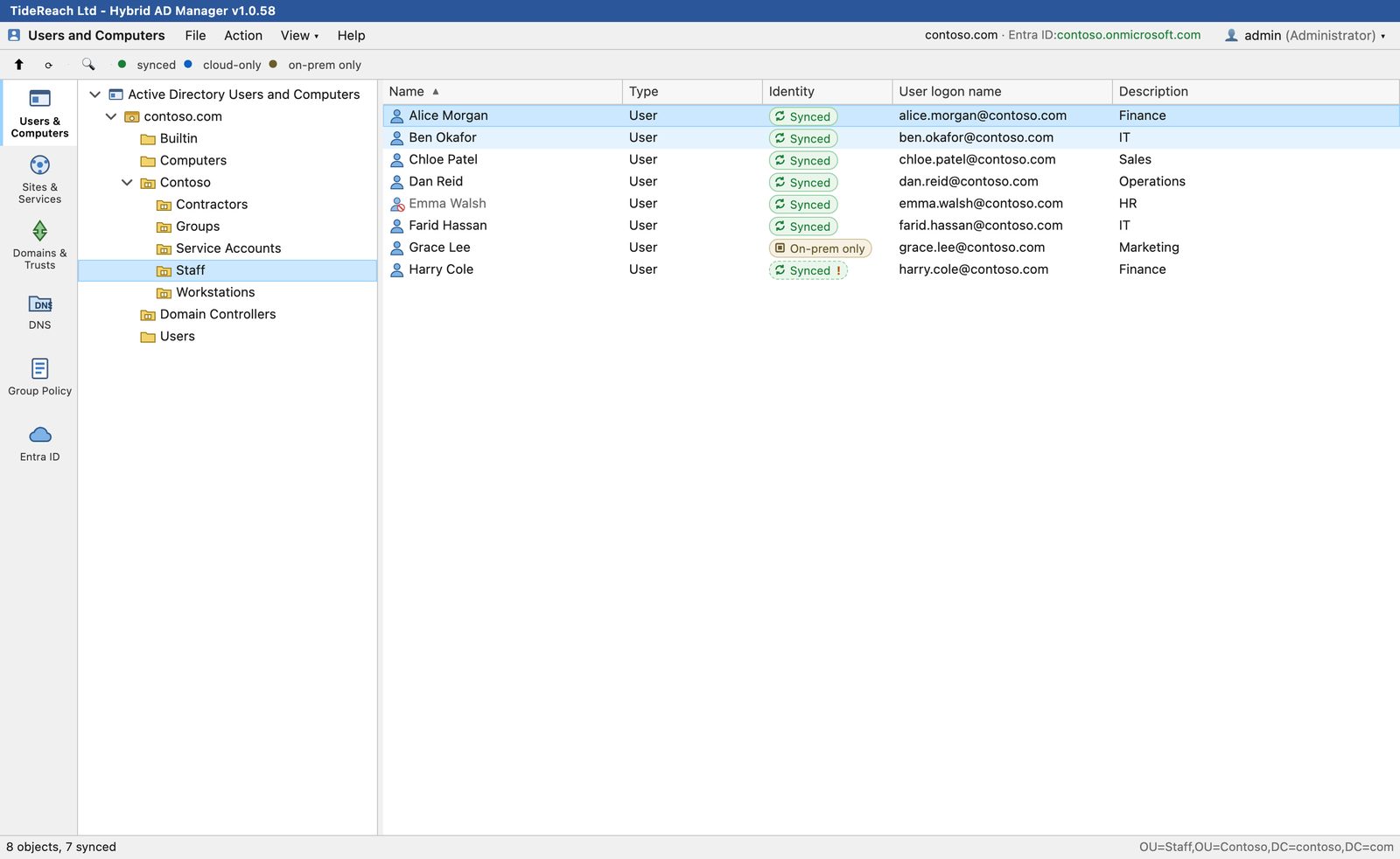
- The consoles you know. Users and Computers, Sites and Services, Domains and Trusts, DNS and Group Policy Management, each in its own tab and laid out like the Microsoft console it replaces. Nobody needs retraining.
- The full property sheets. All thirteen ADUC tabs, including the Security tab with its Advanced permissions editor, and an Attribute Editor that shows every attribute, as ADSI Edit does.
- Entra ID beside it. Connect your tenant and it is merged into the same view: every account shows whether it is synced, cloud-only or on-premises only.
- Your own rights. Administrators sign in with their own Active Directory accounts, so every change is made with the permissions Active Directory already gives them and is written to an audit log. There is no second permission model to set up.
- Nothing else to run. HTTPS with your own certificate, LDAPS to the domain controllers, no agents on workstations, no database, no telemetry.
Pricing: the free edition shows every console read-only, so you can see your own directory working before you decide. A licence for making changes is $365 (£275) a year for one domain, one Entra ID tenant and two administrators signed in at once, and there is a free 30-day trial of the full product.
Group Policy: GPOs are created, linked, ordered and enforced in the console. The policy settings inside a GPO are edited in Microsoft's Group Policy Management Editor, from the SYSVOL path the console shows you.
Side by side
| Users and Computers with full property sheets | Sites, trusts, DNS and GPO links | Entra ID | From an iPad | What it needs | |
|---|---|---|---|---|---|
| Remote desktop | Yes | Yes | A separate portal | With difficulty | A management server; RDS licences past two sessions |
| Windows VM | Yes | Yes | A separate portal | No | A Windows licence and a VM per administrator |
| LDAP tools | Raw attributes | No | No | No | LDAP knowledge |
| Windows Admin Center | The basics | DNS | No | In a browser | A Windows server |
| Hybrid AD Manager | Yes | Yes | Merged in | Yes | A Windows server you already have |
Who it is for
Hybrid AD Manager was built for administrators on Macs, Linux machines and iPads who are tired of the jump box; for help desks that need the consoles without a Windows desktop each; and for hybrid estates that want Active Directory and Entra ID in one view.
The free edition shows your own directory read-only, so you can see it working on your real domain in a few minutes, and the trial gives you the full Standard edition for 30 days.
Download the free edition · Start a 30-day trial · Compare with ManageEngine ADManager Plus